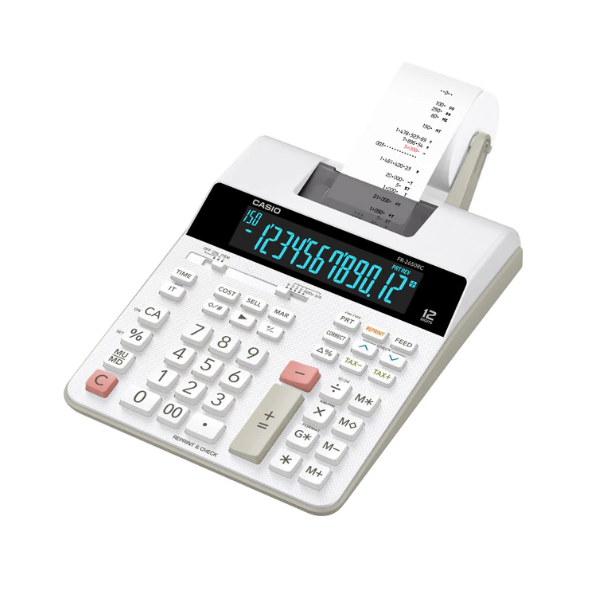
CASIO FR-2650RC Printing Calculator
Unit : Pcs
Features
Next-Generation FR Printing Calculators

Features
Reprint

Print multiple copies of the calculation history without re-inputting data.

Save time!
After Print
Since it is possible to print later even in print off mode, misprints can be decreased.
Save money!
Check

View calculation history on the display without printing.
Save money!
Clock / Calendar

Can print the time and date

Easy to use
Design Highlights
Textured finish

Vertical backlight light distribution for an easier-to-read LCD
 VA LCD with backlight
Text width : 195% of the previous CASIO model
Text height : 155% of the previous CASIO model
 Digitron
Usage Examples
Office

Check After Print
Review the calculation history before printing to decrease misprints.
Save money!
Shop

Reprint
Print a customer copy and shop copy of the same history without re-inputting data.
Save time!
Useful Functions

- Cost / Sell / Margin Calculations
- Clock / Calendar Function
You can press TIME key to display current time and date. - Item Counter & Averages
- Mark Up / Mark Down
- Total & Grand Total Calculation
- Reprint Function
You can press REPRINT key to reprint operation and calculation results. - Check & Correct
Use the and keys to scroll through up to 150 steps of past calculations. - Tax Calculations
- 4-Key Independent Memory
Printing Samples
Tax Calculations

COST, SELLING PRICE AND MARGIN
Easy calculation of cost, selling price and margin


Check & Correct


Specifications
-
Dest-Top Type
-
12 digits
-
2.0 line-per-second printingThe value indicates the number of lines printed per second.
-
2-color printingPositive values are shown in black, and negative values are shown in red for easy checking.
-
Clock & Calendar PrintingPrinting the current time and date.


-
Reprint / After PrintPrint multiple copies of the calculation history. / Print the calculation history later even in print off mode.
-
Regular percentRegular percentage calculations.
-
150 steps checkDisplays up to 150 previous calculation steps.
-
Tax calculationAutomatic calculation of price plus tax, price less tax, discount, selling price, tax amount, discount amount, and margin amount.
-
Cost/Sell/MarginCalculate the cost, selling price, or margin of profit on an item, given the other two values.
-
Mark-up/Mark-downAll the mark-up/mark-down capabilities of an adding machine for simplified cost and profit calculations.
-
Function command signsA symbol (+, -, ×, ÷) on the display indicates the status of operation you are currently performing.
-
Rounding selectorF: Floating decimals. CUT: Values are cut off. UP: Values are rounded up. 5/4: Values are rounded off.
-
Decimal selector4,3,2,1,0 : Specifies the number of decimal places as 4,3,2,1,0. ADD2: 2 decimal places are assumed for entries and results of all addition and subtraction operations.
-
Key rolloverKey operations are stored in a buffer, so nothing is lost even during high-speed input.
-
Extra Large displayLarger display makes more data easier to read.
-
Plastic keysDesigned and engineered for easy operation.
-
Adapter Included


Size of case / Total weight
- Dimensions (D × W × H) : 313×195×64.7mm
- Weight : 620g
Except shopping at our retail shop, customers now can make your orders of office supplies Via Internet or fax 2110 9447.
With purchase over $400, free delivery service will be provided for commerical area only.
If there are any enquiries, please feel free to contact our Customer Services at 2389 1329.
No reviews yet
Be the first to share your experience!
Write a review
You must log in as a member to write a review.Login here